
The CNC for Joinery Estimating
Joinery takeoff software, purpose-built for commercial fitout estimating
Connected drawing navigation and AI scope detection for commercial joinery, cabinetry, and fitout, with the estimator in control.












“Full days down to literally minutes.”
“TakeoffBOT cut the time I spend taking off product by about 90%. I put that time back into checking the work elevation by elevation, so my bids go out faster and I’m more confident nothing was missed.”
You took the bottleneck off the shop floor. It moved to estimating.
Hours lost daily
Setup, navigation, counting across PDFs. Rebuilding takeoffs across tools. Recreating spreadsheet structures sheet by sheet.
Tender volume capped
Fewer tenders submitted before deadlines. Less time for scope review and risk assessment.
Experience wasted
Estimators should be using their expertise to make judgement calls and reduce risk. Instead, they're wasting their time doing clerical work.
Built for how joinery drawings actually work
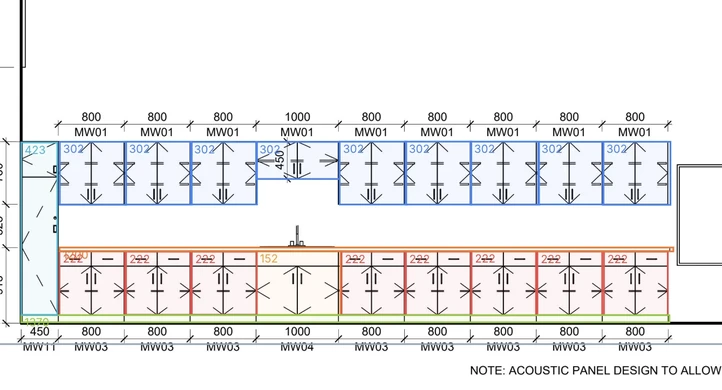
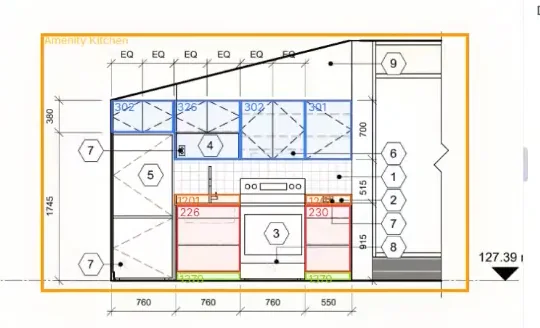
One joinery schedule row can apply to units across multiple rooms, levels, or zones. Callouts scatter scope across plans, elevations, and sections. TakeoffBOT connects them: linked callout navigation jumps you between every reference instantly, and AI detects and pre-tags cabinetry, wall panelling, and specialty joinery during upload. General construction takeoff tools treat drawings as flat pages. We don’t.
Comparing tools? → See how TakeoffBOT stacks up against other joinery takeoff tools
About 90% less time taking off product
Steve Weldon, Senior Estimator, Mahogany Inc., on live Division 06/12 tenders
ROM before the full takeoff
Level 1 budgets for early go/no-go calls
AWI and AWMAC built in
Standard casework and millwork product libraries included
Result reported by a customer estimator on live tenders. Every takeoff is estimator-reviewed before pricing; you approve scope, so accuracy stays in your hands, not the AI’s.
How it works
Upload your plans
Upload your commercial drawing set. TakeoffBOT sorts plans, elevations, and details, links callouts across every sheet, detects cabinetry and joinery items, and produces a first-pass takeoff for your review.
Review and approve
Review and approve. You’re in control. Verify products and unit rates, adjust or add custom items, and share takeoffs across your team so estimators and reviewers work from the same project. Every number is estimator-approved before it becomes part of a tender, so AI speed never costs you judgment.
Export and submit
Export and submit. Produce professional summary reports and ROM budgets for tender decisions. For many workshops, TakeoffBOT’s output is ready to use as it is. For others it is clean, structured data your estimator shapes into your own format. Either way, export quantities to Excel or CSV that drop cleanly into your workshop software.
Simple pricing for joinery teams
One plan, every feature, priced per estimator seat.
Professional
Monthly billing
Professional
Annual billing
Frequently asked questions
What is joinery takeoff software?
Joinery takeoff software helps estimators count and measure joinery items from architectural drawings. TakeoffBOT uses AI to identify cabinetry, built-in furniture, wall panelling, reception counters, and specialty joinery from PDF plans and elevations.
Does TakeoffBOT work for UK and Australian joinery projects?
Yes. TakeoffBOT supports metric measurements and joinery terminology used in the UK and Australia. Upload your drawings in any standard PDF format and get takeoffs organised by room, level, or zone.
What types of joinery can TakeoffBOT detect?
TakeoffBOT identifies base units, wall units, tall units, benchtops, splashbacks, wall panelling, reception desks, built-in wardrobes, vanity units, and specialty joinery items. You can add custom product types for your workshop.
Can I export takeoffs to my existing systems?
Yes. Export to Excel (.xlsx) or CSV format. Takeoffs include itemised lists with quantities, dimensions, and your pricing — ready to import into your quoting or ERP system.