
The CNC for Millwork Estimating
Millwork takeoff software, purpose-built for commercial estimating
Connected drawing navigation and AI scope detection for Division 06 casework, cabinetry, and joinery, with the estimator in control. Commercial, institutional and multifamily.
What our customers say
“Full days down to literally minutes.”
“TakeoffBOT cut the time I spend taking off product by about 90%. I put that time back into checking the work elevation by elevation, so my bids go out faster and I’m more confident nothing was missed.”
“Intuitive, accurate, and saves us valuable time on every job.”
“TakeoffBOT does an excellent job identifying cabinets directly from plan sets. It’s incredibly easy to use and generates a detailed report I can include directly with client proposals.”
“A significant step forward for millwork estimating.”
“TakeoffBOT has improved the efficiency of our estimating workflow and reduced the manual effort required to produce reliable, consistent results. It’s a tool I believe will continue to shape the future of millwork and cabinet estimating.”
 Andreas MairIT/Networking Administrator, Paul Mair Design Inc.

























You took the bottleneck off the shop floor. It moved to estimating.
Millwork shops have spent two decades automating production: CNC routers, edgebanders, nesting software. The estimating department still works the old way. Hundreds of pages of drawings, page-flipping between plans, elevations and specs, counting the same box forty times, re-keying numbers into spreadsheets.
Hours lost to setup.
Sorting sheets, hunting for callouts and counting by hand before any real estimating starts.
Senior judgment spent on clerical work.
You hired an estimator for what they know about scope, pricing and risk. Most of their week goes to finding information.
Built for how millwork drawings actually work
One schedule row drives multiple elevations. Callouts scatter scope across plans, elevations, and sections. TakeoffBOT connects them: linked callout navigation jumps you between every reference instantly, and AI detects and pre-tags AWI and AWMAC casework and millwork products during upload. General construction takeoff tools treat drawings as flat pages. We don’t.
Comparing tools? See how TakeoffBOT stacks up against 8 other takeoff tools for millwork
One connected takeoff, from drawing set to BOM-ready export
Lightning Navigation
Click a callout and jump straight to the elevation, section or detail it points to. No more flipping through a 400-page set to find where a cabinet is drawn.
AWI and AWMAC products, pre-tagged
Casework and millwork products from the AWI and AWMAC standard libraries are tagged on upload. Add your shop’s own products as you go.
Review Guardrails
Every detected item waits for your review. You approve, adjust or add before anything is priced. Estimator-approved scope by design.
ROM budgets and BOM-ready exports
Level 1 ROM pricing for early go/no-go calls, summary reports for your proposal, and BOM-ready Excel or CSV exports that import into Cabinet Vision, Microvellum and your engineering software.
Built for the millwork work you actually bid
Commercial and institutional millwork
Healthcare, education, office and hospitality casework and architectural millwork, specified to AWI and AWMAC standards.
Commercial millwork takeoffMultifamily millwork
Unit kitchens, vanities and amenity millwork repeated across every unit type, building and floor. Count it once, review it once, roll it up.
Multifamily millwork takeoffJoinery and fitout
Commercial fitout and shopfitting joinery for UK and Australian teams, in metric with local terminology.
Joinery takeoffAbout 90% less time taking off product
Steve Weldon, Senior Estimator, Mahogany Inc., on live Division 06/12 bids
ROM before the full takeoff
Level 1 budgets for early go/no-go calls
AWI and AWMAC built in
Standard casework and millwork product libraries included
Result reported by a customer estimator on live bids. Every takeoff is estimator-reviewed before pricing; you approve scope, so accuracy stays in your hands, not the AI’s.
You weren’t hired to find the information. You were hired to know what it means.
TakeoffBOT takes on the mechanical work: sorting sheets, linking callouts, counting repeat items. You spend your time on scope gaps, pricing, risk and the call on what goes in the number.
Bid more of the right work.
Get a Level 1 ROM on a new set before you commit estimating hours or shop capacity to it. Pass on the jobs that will not pay, and put your senior people on the ones that will. The worst bid isn’t always the one you lose. Sometimes it’s the one you win.
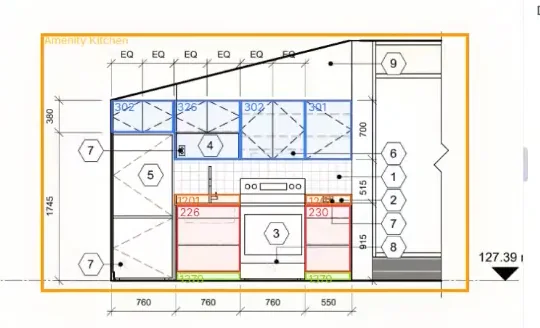
How it works
Upload your plans
Upload your commercial drawing set. TakeoffBOT sorts plans, elevations, and details, links callouts across every sheet, detects AWI and AWMAC casework and millwork products, and produces a first-pass Division 06 takeoff for your review.
Review and approve
You’re in control. Verify products and unit rates, adjust or add custom items, and share takeoffs across your team so estimators and reviewers work from the same project. Every number is estimator-approved before it becomes part of a bid, so AI speed never costs you judgment.
Export and submit
Produce professional summary reports and ROM budgets for bid/no-bid decisions. For many shops, TakeoffBOT’s output is ready to use as it is. For others it is clean, structured data your estimator shapes into your own bid format. Either way, export BOM-ready quantities to Excel or CSV that drop cleanly into Cabinet Vision, Microvellum, and your engineering software.
Simple pricing for millwork teams
One plan, every feature, priced per estimator seat.
Professional
Monthly billing
Professional
Annual billing
Frequently asked questions
Is TakeoffBOT built for commercial millwork specifically?
Yes. TakeoffBOT is purpose-built for Division 06: commercial casework, architectural millwork, cabinetry, and joinery. It is not a general construction takeoff tool adapted for millwork. It is built around how millwork drawings work, where scope lives in schedules and elevations rather than in plan view.
What makes it different from Bluebeam, STACK, or Togal?
Connected drawing navigation. TakeoffBOT links callouts across plans, elevations, and sections so one schedule row correctly drives every elevation it appears in. General takeoff tools treat each sheet as a flat page. TakeoffBOT also produces ROM budgets for bid/no-bid decisions and BOM-ready exports to Cabinet Vision, Microvellum, and Excel.
See the full comparison of TakeoffBOT vs. Bluebeam, Togal.AI, STACK, PlanSwift and other millwork takeoff toolsDoes TakeoffBOT produce a finished bid document?
It depends on how your shop bids. For shops with straightforward formats, TakeoffBOT’s summary reports and exports are often ready to use as they are. For shops with custom or complex bid templates, TakeoffBOT gives you clean, structured scope and BOM data that your estimator shapes into your existing format. In both cases you stay in control of the final number and the document that goes out. If you need a specific output format, tell us what you need and we may be able to help.
Does the AI replace the estimator?
No. TakeoffBOT drafts the scope. The estimator reviews and approves every item before pricing. You get the speed with your judgment in control. Scope is estimator-approved by design.
It’s estimating’s turn.
Book a demo and bring a drawing set you know. See what your estimators do with the time TakeoffBOT gives back.